 Beatrice
If you manage a website with hundreds of product images, blog graphics, or documentation screenshots, writing alt text can feel like an endless, low-value task. It's often the last box to check before publishing, done hastily or skipped entirely. Yet, for SEO and accessibility, descriptive alt attributes are non-negotiable. They provide crucial context to search engines and are essential for screen reader users. The promise of AI-generated alt text is to automate this repetitive work, freeing up time for more strategic SEO tasks. This guide examines how to implement AI for alt text effectively, identifies the practical limits of fully automated solutions, and outlines the quality controls needed to avoid damaging your site's user experience and search performance.
Why alt text remains a critical SEO and accessibility checkpoint
For search engines, an image is a visual black box. The alt attribute is the primary signal used to understand and index that image's content. It directly influences rankings in Google Image Search and contributes to the overall topical relevance of a page. For a user relying on a screen reader, alt text is their only way to comprehend the image's purpose and information. Ignoring it creates a poor experience and can expose a business to legal risk under accessibility laws like the ADA or WCAG. Many teams treat it as a minor SEO tweak, but its functional importance is foundational. In audits, we consistently find that pages with thorough, descriptive alt text perform better in attracting qualified, long-tail traffic through image search, which often converts at higher rates.
The manual process has clear bottlenecks. A content creator must stop their main workflow, analyze an image, and compose a concise, descriptive sentence. For large catalog sites, this scaling problem becomes unsustainable. This is where automation presents a compelling case: an AI model can analyze an image's visual elements and generate a textual description in seconds. The core question shifts from "should we automate" to "how can we implement automation without sacrificing the quality and intent that makes alt text valuable in the first place?"

How AI image recognition and captioning models actually work
To use AI effectively, you need a basic understanding of its mechanics. Most AI services for alt text rely on a type of machine learning called computer vision. These models are trained on millions of image-text pairs. They learn to identify objects (like a "red bicycle"), scenes ("a mountain trail"), actions ("a person riding"), and sometimes even emotions or abstract concepts. When you submit an image, the model doesn't "see" it as a human does. It analyzes pixel data patterns and matches them against learned patterns to produce a probability-based description.
The difference between object detection and contextual understanding
A common point of failure is confusing these two levels. Basic models excel at object detection. They can reliably list items: "dog, grass, ball." This is better than nothing, but it's poor alt text. Good alt text requires contextual understanding and intent. Why is the dog there? Is it a stock photo of a generic dog, or is it the specific therapy dog featured in your hospital's community outreach article? An AI might generate "a dog on a lawn." A human would write "a golden retriever therapy dog wearing a vest sits calmly with a patient in a hospital garden." The latter includes purpose and narrative, which AI often misses unless specifically trained on such niche contexts.
Inherent biases and training data limitations
AI models inherit the biases of their training data. If a model was trained primarily on Western image banks, it may struggle with accurately describing cultural attire, foods, or settings from other regions. Similarly, it might default to certain assumptions about activities or professions based on gender or age present in the images. For a global brand, this isn't just an accuracy issue; it's a brand safety and inclusivity risk. You cannot assume the AI's output is neutral or universally accurate. It requires a human lens to spot and correct these biases.

Building a scalable, quality-controlled AI alt text workflow
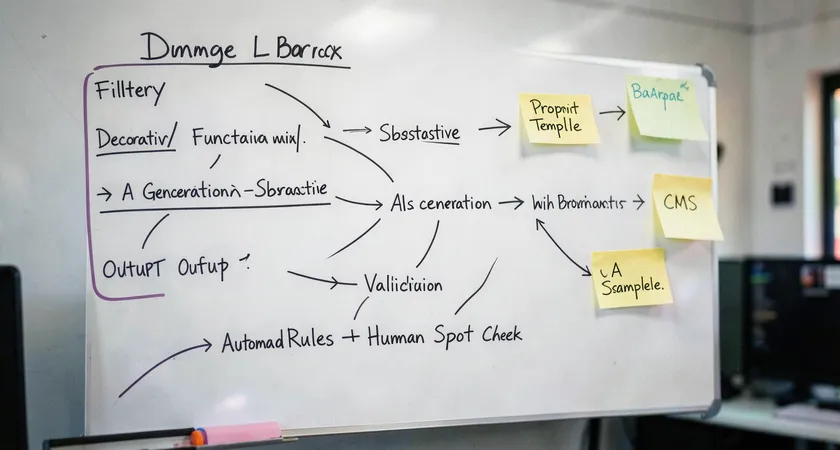
Successful automation relies on a workflow, not just a tool. The goal isn't to remove humans from the loop, but to reposition them as quality assurance editors rather than primary writers. A robust workflow has three key stages: pre-processing, AI generation, and post-processing validation.
Start with pre-processing. This involves programmatically filtering your image library. Decorative images, like stylistic dividers or pure background graphics, should receive empty alt attributes (alt="") to signal screen readers to skip them. Sending these to an AI wastes resources and generates clutter. Use simple rules: images below a certain size threshold, or with filenames containing "bg" or "divider," can be auto-assigned a null alt. Functional images, like icons representing actions, should get their function as alt text (">" becomes "next page"), not a description of their appearance. Only substantive, content-rich images proceed to the AI generator.
The generation stage is where you choose and configure your AI engine. Options range from cloud APIs like Google Cloud Vision, Amazon Rekognition, or OpenAI's CLIP-based models, to specialized SaaS platforms. Critical here is prompt engineering. You are not asking the AI to "describe this image." You are giving it a specific instruction tailored to your content. For an e-commerce site, your prompt might be: "Generate a concise, factual alt text for a product image. Describe the product, its key visible features, and its color. Do not use marketing language like 'beautiful' or 'amazing.'" This steers the output toward utility.
The final, non-negotiable stage is post-processing validation. This can be a lightweight human check or a rules-based automated filter. Automated filters can flag outputs that are too short (e.g., less than three words), contain certain forbidden terms, or lack a verb. The most effective validation we've seen involves a periodic audit. For every 100 AI-generated alt texts, a human editor reviews 10-15 sampled outputs against a rubric. This ongoing spot-check maintains quality and provides feedback to refine the AI prompts.
Common pitfalls and limitations of a pure DIY approach
Adopting an off-the-shelf AI API and connecting it directly to your CMS seems straightforward. In practice, this DIY path is where most projects stumble. The first pitfall is cost misestimation. While per-image costs are fractions of a cent, volume scales unpredictably. A site with thousands of images regenerating during site migrations or batch updates can incur surprising bills. More importantly, the operational cost shifts from writing to troubleshooting. You now own the integration, error handling, rate limiting, and output debugging.
The second, deeper pitfall is the "set and forget" mentality. AI models and SEO best practices evolve. Google's guidance on image SEO updates. The model you integrated six months ago may have been surpassed by a newer one offering better contextual awareness. Maintaining a competitive edge requires ongoing evaluation, which is a project in itself. Most internal teams lack the cycles to proactively manage this.
The third limitation is handling edge cases and nuance. How should your AI describe complex infographics, detailed charts, or memes? For infographics, the alt text should summarize the key takeaway and point to a text alternative, not list every data point. A chart needs its trend and conclusion stated. A meme's humor often relies on cultural context the AI won't grasp. A DIY system typically fails gracefully on these, either producing useless output or, worse, misleading descriptions. These edge cases, while a small percentage of total images, often represent the most important content.
Field feedback indicates that teams who go fully DIY often reach a point of diminishing returns. They spend as much time managing, correcting, and worrying about the AI as they once did writing alt text manually, just with a different skill set.

Benchmarking success: Measuring the impact on SEO and UX
How do you know if your AI-generated alt text is actually working? Vanity metrics like "number of images tagged" are meaningless. You need to track outcomes related to search performance and user engagement. Start with Google Search Console. Monitor your performance in Google Images. Look for increases in impressions and clicks for pages where you've deployed AI-generated alt text. Segment this data by page type to see if product pages are benefiting more than blog posts, for example.
For accessibility impact, while harder to measure directly, you can use proxy metrics. Tools like Lighthouse (built into Chrome DevTools) provide an accessibility audit score. Improving your alt text should raise that score. You can also monitor support tickets or feedback forms for mentions of accessibility issues; a decrease is a positive signal.
Ultimately, the best benchmark is qualitative. Conduct a quarterly manual audit. Pick 20 pages across your site. Read the alt text aloud. Does it accurately and usefully describe the image? Does it fit naturally into the surrounding content? Does it avoid awkward or biased language? This human review is the final arbiter of quality. Automation should serve this quality standard, not define it down to the lowest common denominator.
The strategic role of expert implementation and oversight
Given the complexities of prompt engineering, bias mitigation, workflow design, and ongoing maintenance, implementing AI for alt text effectively transitions from a simple technical task to a strategic SEO and content operations project. This is where expert guidance transitions from a luxury to a efficiency-saver. A specialized provider isn't just selling an API call; they are offering a managed service that includes the initial audit to classify your image types, the development of tailored prompt libraries for your industry, the design of the validation workflow, and the ongoing model evaluation and updates.
Such oversight ensures the system adapts. When Google releases new image SEO guidelines, the provider's team updates the prompting strategy. When a new, more accurate vision model becomes available, it can be trialed and integrated. This turns a static automation into a dynamic asset. For most businesses, the return on investment isn't just in hours saved on writing 'dog on grass' descriptions. It's in the compounded SEO value of a fully optimized, accessible, and professionally managed image library that consistently contributes to domain authority and user satisfaction, while mitigating compliance risk.

AI-generated alt text represents a significant step forward in scaling technical SEO. It turns a manual, tedious process into an automated, data-driven one. The key to success lies in recognizing that AI is a powerful draftsperson, not a final editor. It can produce the raw material, a baseline description, with incredible speed. The human role evolves into that of a strategist, prompt engineer, and quality auditor. By building a workflow that combines AI's scalability with human judgment for context, nuance, and brand voice, you can enhance your site's SEO and accessibility comprehensively. The next step is to audit your current image inventory, categorize your needs, and design a pilot workflow for one section of your site, measuring the impact rigorously before scaling.